Manual Timesheets vs. Time Tracking Software for Employees: Accuracy, Compliance, and Efficiency Compared

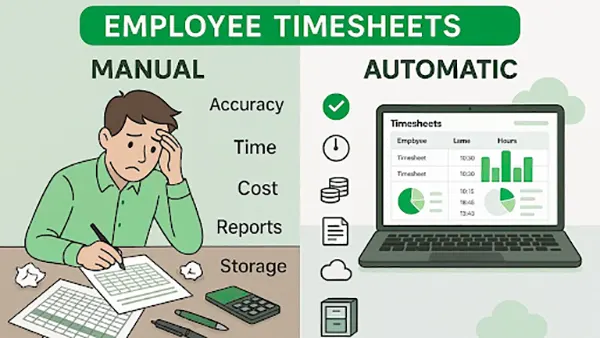
The manual timesheets have been used for a long time in the corporate to measure employee workhours, calculate payrolls, and even productivity. But now a new system is taking over: Time tracking software for employees.
These new tools do everything that traditional workbooks used to do, but better. But people fear change and the unknown, so many of the organizations are yet to implement these systems and still operate on the old manual timesheets.
They do that because these new systems are expensive to implement as well. So they think why put money in a new system which will also need training, when the firm is functioning well. And this sounds plausible as well. However, automated time and attendance systems can save you much more in the long term than you might invest in the short term implementing them. You know manual timesheet systems leak firm payroll by 3-8% (Source).
The corporate landscape has changed drastically in last few years. People want remote work, regulations are stricter, and it’s becoming harder and harder for businesses to scale. So, implementing a newer system which can help with that makes absolute sense.
In this article, I’ll compare the pros and cons of both, the obsolete manual timesheets and the new-age hour tracking software.
KEY TAKEAWAYS
- Manual timesheets are simple and inexpensive, but automated time trackers save you more in the long term in terms of payroll and employee work hours.
- Manual systems can be ok for small firms, but they still introduce inaccurate entries, administrative workload, and compliance risk.
- Automated systems are a must for big and complex organizations, or even if you’re not presently but aspire to be.
The Accuracy Problem: Human Memory vs. Real-Time Data
Do you remember what you had for breakfast today? How about yesterday? How about a week ago? The human memory system is enigmatic. You believe you remember an event just like it happened, but most of the time, that’s not true.
Employees usually fill in their timesheets on Fridays, recalling their entire workweek. This retrospective logging introduces inaccuracies that may seem minor individually but compound significantly across teams.
People naturally round numbers. A 47-minute task becomes one hour. A two-hour block becomes three. Small overestimations and underestimations distort project data and financial forecasting. In client-facing businesses, this can mean underbilling or overbilling—both of which create problems.
Time tracking software for employees captures data in real time or close to it. Instead of relying on recall, employees log hours as they work or use automated timers connected to specific projects. This produces more precise records and reduces guesswork.
Accuracy is not just about payroll. It affects project estimation, budgeting, and performance evaluation. When historical data is flawed, future planning suffers. Automated systems minimize this risk with standardized workhour recording.
Administrative Burden and Workflow Inefficiency
In manual systems, it’s really simple to add entries, but what about after that? They require quite a bit of work to complete the entries. Managers review submissions, correct inconsistencies, and fill in missing entries. HR departments spend hours consolidating spreadsheets and then only process payrolls. Found some errors in the process? Get ready for additional hours to give for some back-and-forths.
As organizations grow, this administrative load increases. Managing with timesheets was ok for a team of five, but it quickly becomes unsustainable for a team of fifty. The hours that went to this redundant and repetitive work could have gone to improving strategy or operations.
Automated employee timekeeping software reduces this friction. Entries are centralized automatically. Detailed reports are generated in an instant. Export payroll summaries with minimal manual work. Errors are eliminated; hence, work becomes consistent.
Efficiency gains here are both direct and indirect. Managers don’t need that many follow-ups while administrative teams have more time to them for other important tasks. The entire process becomes faster and more robust.
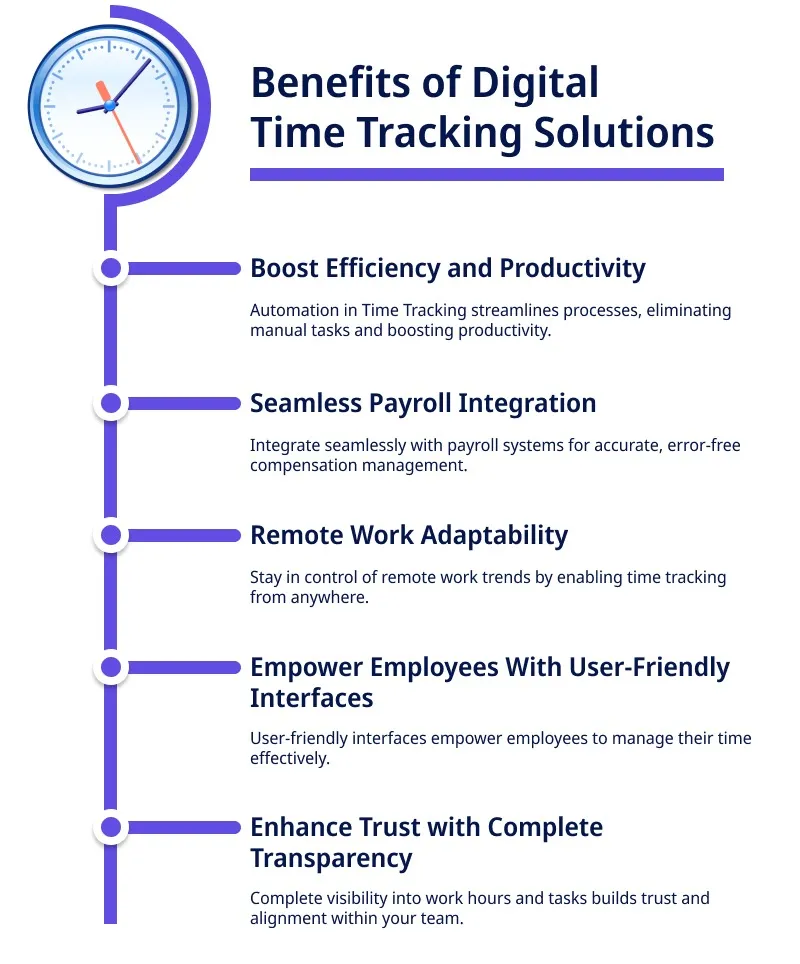
The following infographic lists all the benefits of implementing an automated employee hours tracker:
Compliance and Legal Risk
In many countries, labor regulations are very strict about employee well-being. Firms need to track accurate working hours, overtime, and rest periods. Manual systems increase the risk of incomplete records or inconsistent documentation. In the event of an audit or dispute, missing or ambiguous entries can create legal vulnerability.
Compliance is not just about recording hours—it is about maintaining structured, verifiable documentation. Manual logs are easier to alter or lose. Spreadsheet-based systems may lack secure audit trails.
Automated time and attendance systems for employees typically include hour-stamped entries, automated overtime calculations, and stored historical records. These features provide clearer documentation and reduce exposure to compliance violations.
For companies operating across multiple jurisdictions, standardized tracking systems ensure consistency in applying labor policies. This becomes increasingly important in remote and hybrid environments where employees may work from different regions.
Project Management and Forecasting
The most that manual timesheets can output is the totals. Forget about any data interpretation or insights. If you even try to do that manually, by the time data is consolidated, it may already be outdated. Managers cannot easily identify patterns or inefficiencies in real time.
Hour-tracking software for employees integrates with project management tools, offering ongoing visibility into how resources are allocated. Leaders can see whether certain projects consume more time than expected or whether tasks consistently exceed estimates.
This visibility improves forecasting. Future projects can be priced more accurately. Deadlines can be set based on historical performance rather than optimistic assumptions. Profit margins become more predictable.
Manual systems lack this analytical depth. They record hours but rarely transform it into strategic intelligence.
Employee Experience and Accountability
Let’s accept it. Automated tracking feels much more intrusive than traditional logbooks. Employees feel it. And in turn, firms fear implementing them.
But is this the truth? Maybe not.
Manual reporting often creates its own frustrations. Employees may struggle to remember details, feel pressure to reconstruct their week accurately, or face repeated corrections from managers.
Automated workforce management software simplifies this process. Logging time daily or using integrated timers reduces end-of-week stress. Clear dashboards help employees understand how their hours aligns with expectations.
Accountability also improves. When time data is structured and transparent, performance discussions rely on evidence rather than perception. Employees can reference objective records to demonstrate workload and contribution.
Importantly, accountability does not require micromanagement. Automated tracking provides oversight without constant interruption. Managers gain visibility, while employees maintain autonomy.
Scalability and Business Growth
It’s not like manual systems should be abolished altogether. They might actually be a better option for small firms. However, as organizations expand, its limitations become more pronounced. More employees simply means more entries, more scope for inconsistencies, and, in turn, more time required for corrections.
Automated workforce timekeeping software scales with organization size.
- The process is standardized for every new member.
- Data stays centralized.
- Reporting is consistent across departments and locations.
For firms with remote and hybrid teams, scalability is even more critical. Distributed environments require unified systems to maintain alignment. Manual methods are not cut out for maintaining consistency across time zones and flexible schedules.
Growth demands structure. Automated systems provide that foundation.
Cost Considerations: Perceived Savings vs. Hidden Losses
Manual timesheets are inexpensive. No subscription, no training. However, this view ignores hidden costs: administrative labor, payroll errors, underbilled hours, compliance risks, and inaccurate forecasting.
Automated work-hour-tracking software introduces a clear upfront expense. Yet when organizations calculate total impact—including recovered billable time, reduced correction work, and improved project margins—the financial equation often shifts dramatically.
The real cost comparison is not software versus spreadsheets. It is structured efficiency versus accumulated inefficiency.
Choosing the Right Approach
If the scale, complexity, or compliance requirements of your organization are rising, just go with the automated systems. For small teams with minimal reporting needs, manual systems may function temporarily.
However, businesses that manage multiple projects, remote teams, billable clients, or regulatory obligations benefit significantly from structured digital systems. The transition from manual tracking to automated software represents more than a technical upgrade—it reflects a shift toward operational maturity.
Accuracy improves. Compliance strengthens. Administrative friction decreases. Strategic insight increases.
Conclusion
Traditional workbooks are simple but have scope for inaccuracies. The administrative burden and compliance risk are also on the higher side with this. In contrast, an automated time and attendance system for employees delivers structured precision, real-time visibility, and scalable efficiency.
As organizations navigate remote work, regulatory complexity, and competitive pressure, the limitations of manual systems become increasingly apparent. Automated tracking transforms workhours data into a strategic resource rather than a basic record.
In the long term, the choice is not simply about how hours are recorded. It is about whether time becomes a liability—or a measurable asset that supports smarter decisions and sustainable growth.
Ans: In manual workhour tracking, employees fill in their work themselves, introducing inaccuracy and errors. Automated systems work in real-time, offering better accuracy, detailed reports and reducing the workload of administration.
Ans: Clockify is considered the best overall work-hour-tracking software.
Ans: The 7-minute payroll rule rounds up time to the nearest quarter-hour. For example, 10:07 becomes 10:00, but 10:08 becomes 10:15.